The latest features and improvements in Nevo Money, newest first.
Version 2.2·
Version 2.2, October 2026: Budgets that show what's already spoken for.
Your budgets now show what's already scheduled alongside what you've spent, so you can see where your month is really heading. This update also puts Safe to Spend front and center, and lets you talk with us right in the app.
Five views
Your budgets, five ways
Cards, Landscape, Allocation, Runway and Blocks each show your month a different way, and every one of them shows what's already scheduled next to what you've spent, so two budgets that are both 70% spent no longer look the same when one still has rent on the way. Switch views any time from Views on Budgets.
Allocation
The outer ring is your plan. The inner ring shows Now, Committed or Projected. Slide your finger around a ring to step through your budgets.
Cards
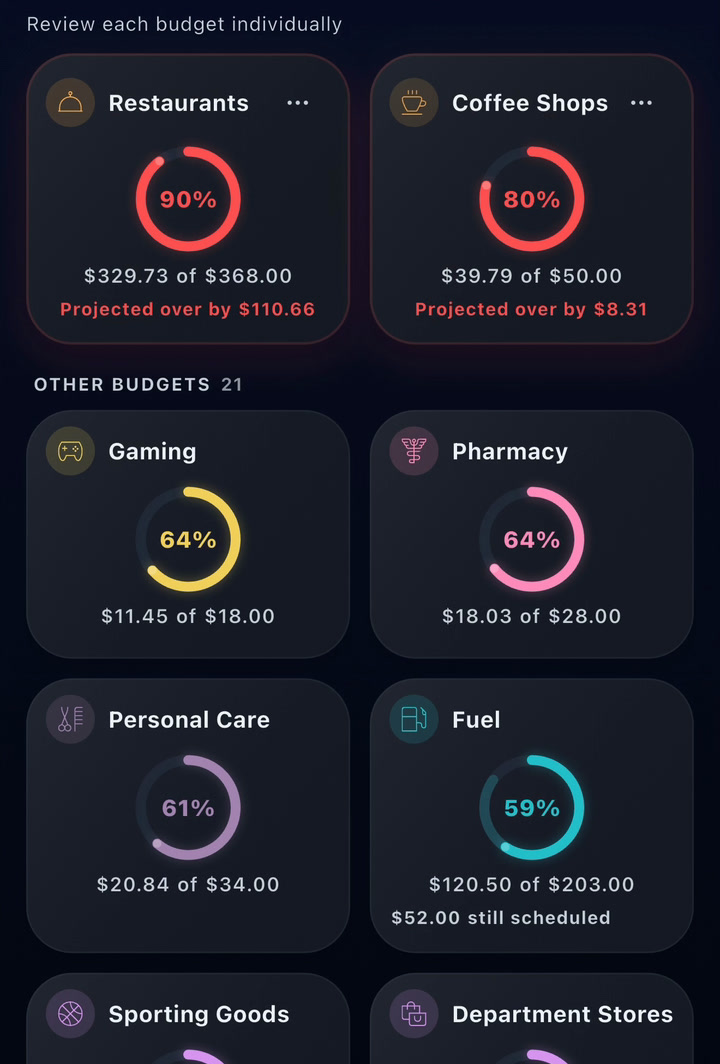
One budget per card. Each card's ring shows what you've spent, and the lighter part is still scheduled.
Runway
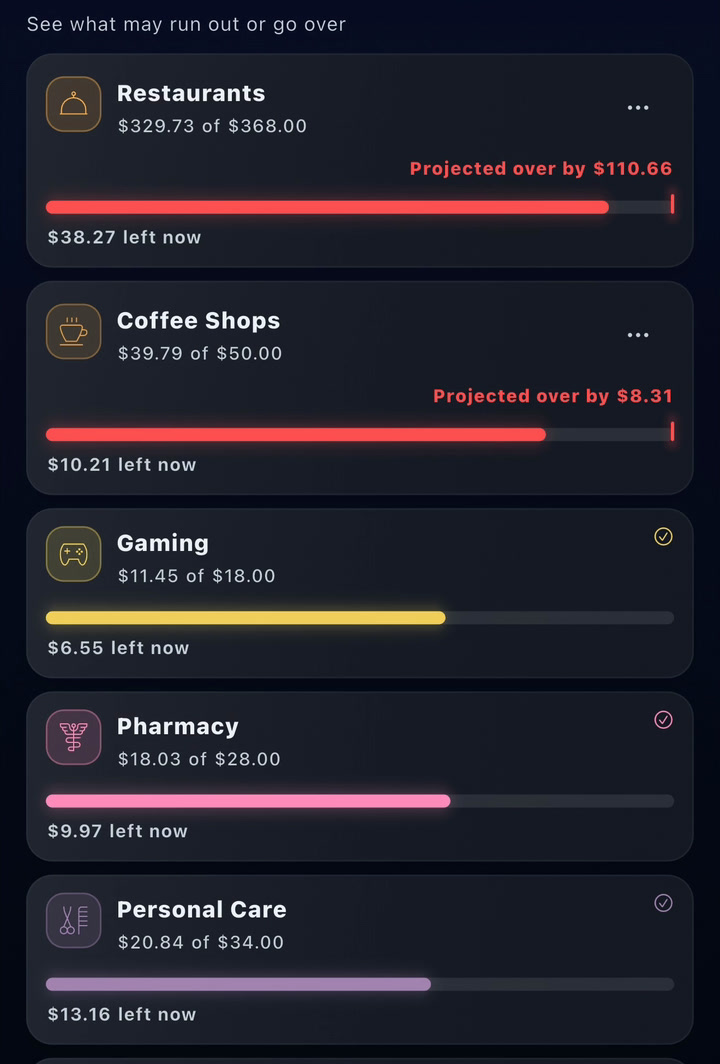
Which budgets could run out. Each bar is one budget: solid is spent, lighter is still scheduled, and the marker is where the month is headed.
Blocks
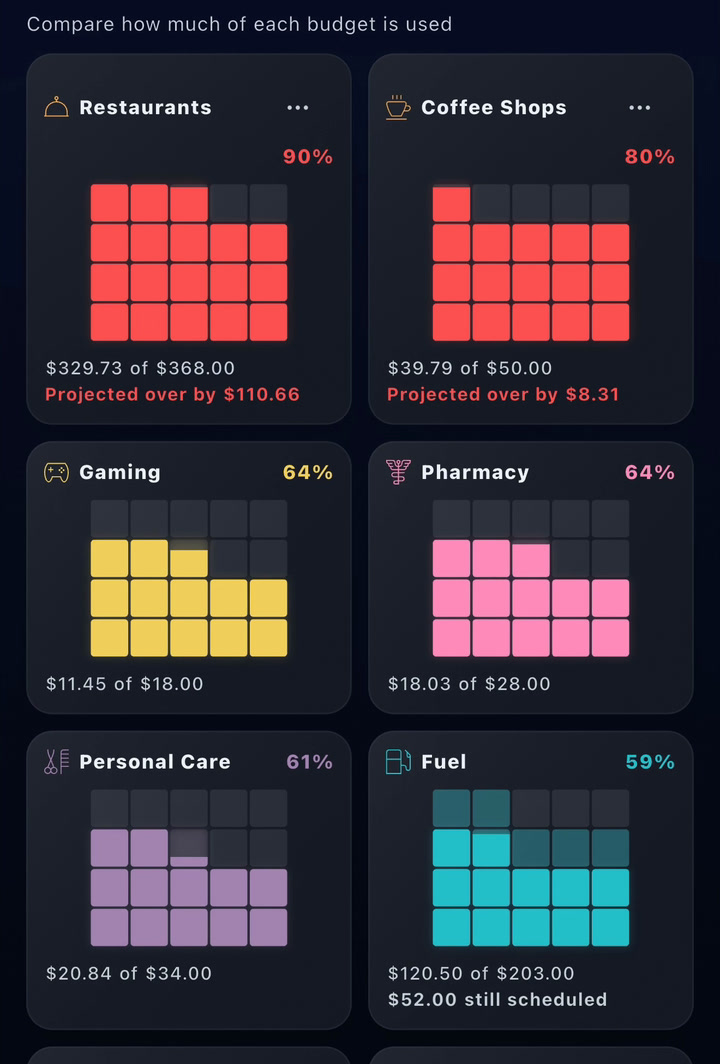
Your budget, block by block. Solid blocks are spent, lighter ones are still scheduled.
Landscape
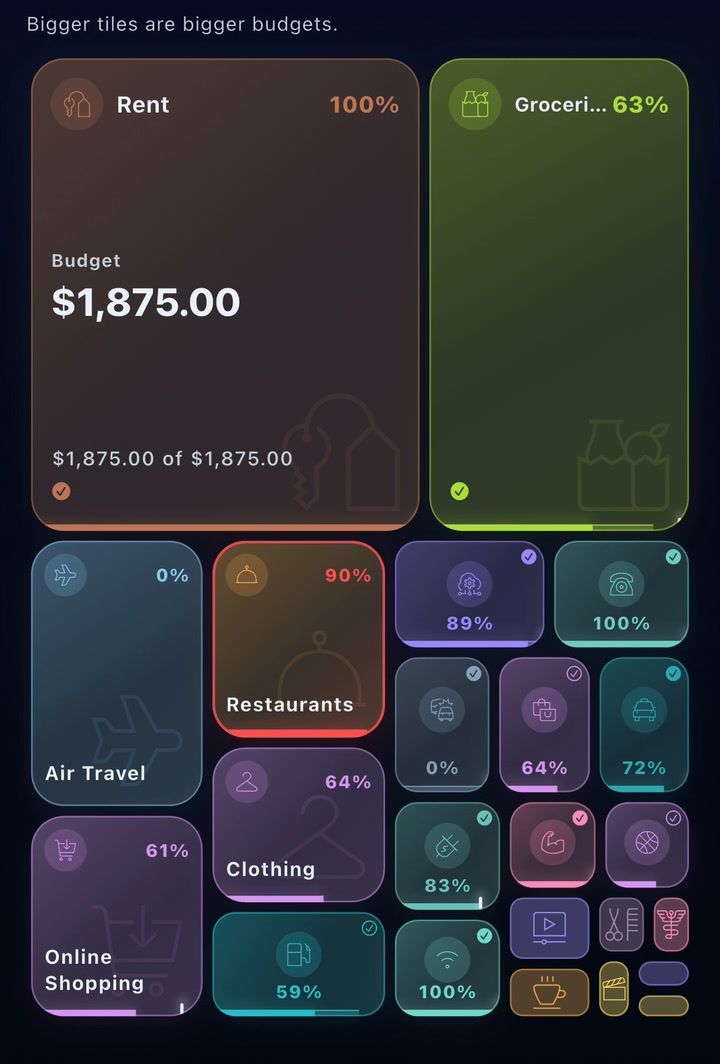
Bigger budgets, bigger tiles. Each tile's bottom edge shows spent, still scheduled and the month-end estimate.
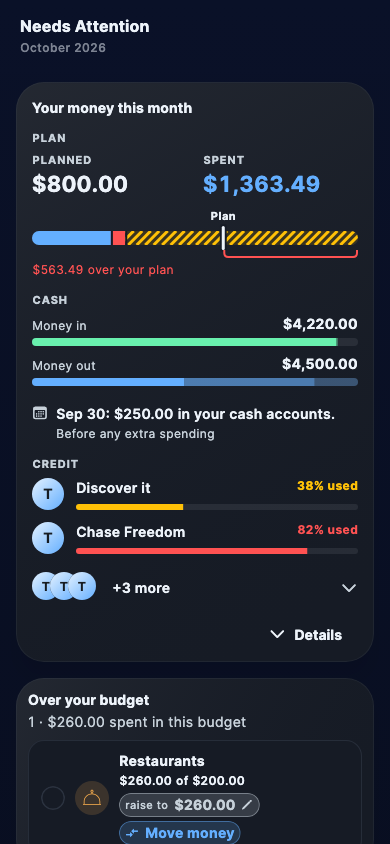
Needs attention
Everything in your month that needs a decision now sits in one list, where you can answer each one, see how your total budget changes and apply what you choose, with Undo if you change your mind. Only bills already on your schedule start pre-selected, and spending you'd rather not budget can be tracked instead: it still counts, and we'll only ask again if it runs well above usual.
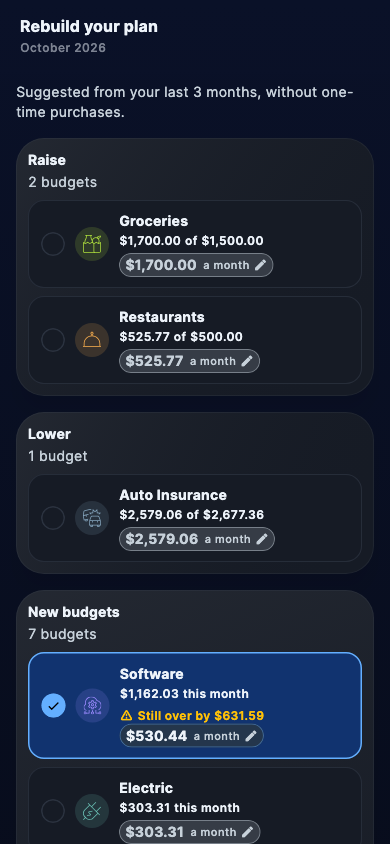
Rebuild from real spending
If your plan has drifted from how you actually spend, Nevo Money offers to draft this month's plan from your last three months, leaving out purchases marked one-time. Review every row and keep what fits, and nothing changes until you apply it.
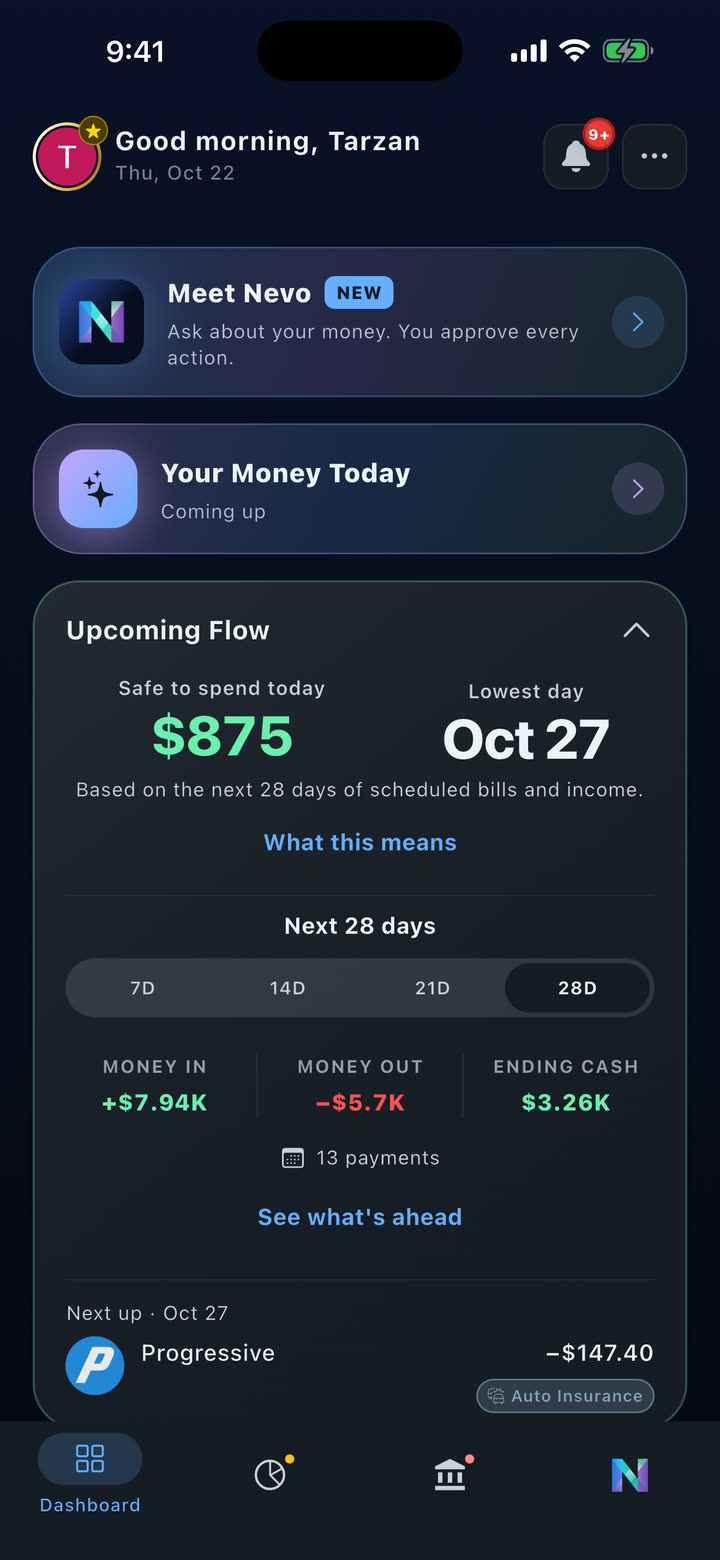
Safe to Spend, up front
Safe to Spend is now the headline on your Upcoming Flow card, says plainly that it looks 28 days ahead, and tells you when your tightest day falls outside the range you're viewing. Tap any day on the calendar to see what's landing and how your cash looks afterward, and What this means shows how it was worked out.
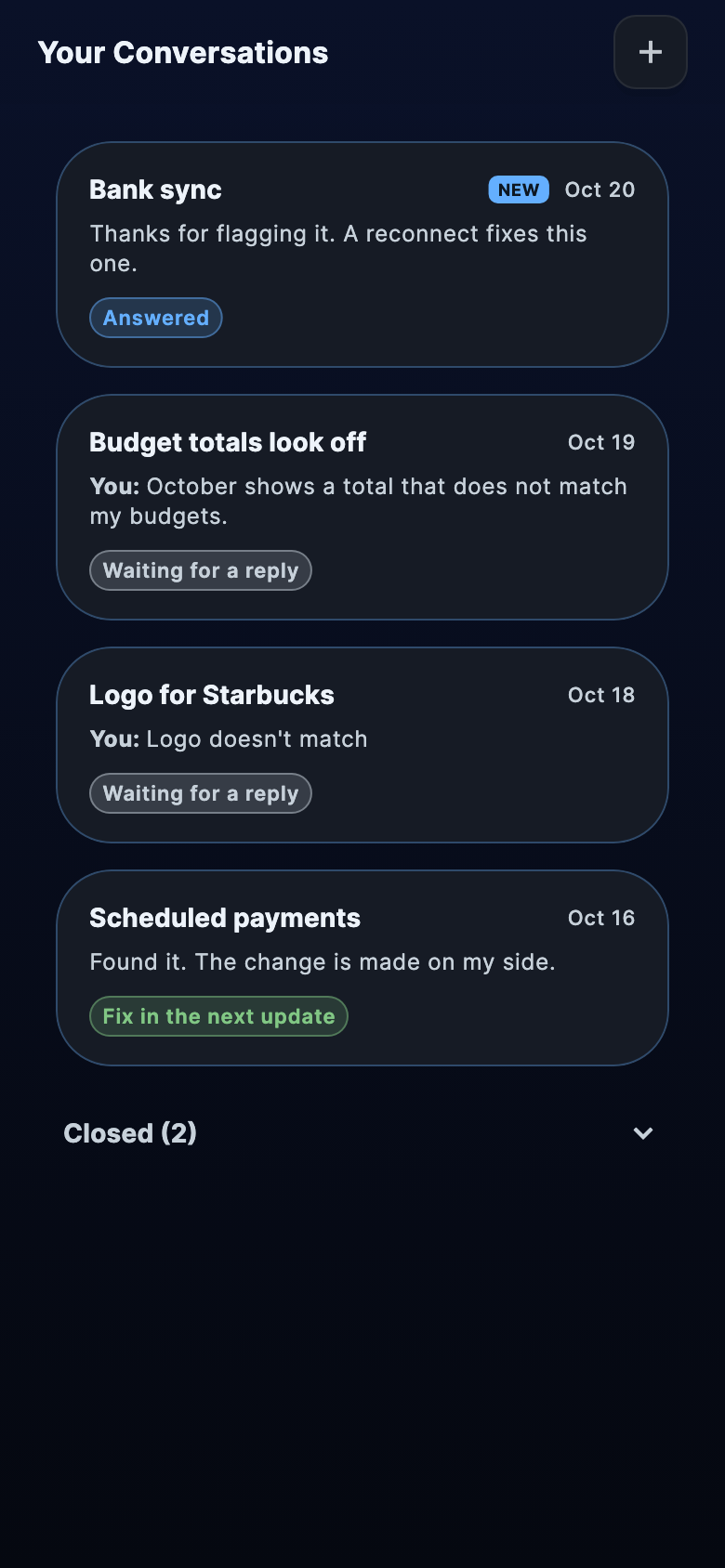
Support, right in the app
Report a problem, or flag a Nevo answer that looked wrong, and read our reply in Your Conversations. You'll get a notification when we write back.
Sample month
$420Groceries
Budgets
Spent$420
Still scheduled$96
Plan$600
Needs attention
DiningProjected to go overCovered+$45$0
Move money
$45
Groceries$600$555
Dining$200$245
Budgets
Spent, still scheduled, and what to do about it.
As you scroll, the ring fills with what's spent and what's still scheduled, Needs attention flags the budget headed over, and Move money covers it from another budget.
Sample data. Not a real account, and not a promise of results.
Also in this release, Version 2.2
On the Needs attention screen, a new Your money this month panel brings your plan, your cash and your credit cards together.
Move money from several budgets at once to cover one that's over. It changes your budgets, never your accounts.
Next month's review now suggests a budget for bills on your schedule that don't have one yet, starting from their scheduled amount.
When we have a record of the plan your month started with, Budget Health grades against it, so raising a budget after you've already spent no longer lifts the grade.
If your card issuer owes you money after a refund or overpayment, your card now shows that credit instead of zero, and it isn't counted as debt in your totals.
Daily balances in account history now show your posted balance at the end of each day, without pending charges mixed in.
Open your notifications and the bell clears right away, with new items marked for a moment and left unread until you open them.
Connection Health now tells you when a bank has stopped sending new transactions, and offers a way to repair it.
Plus new animations throughout the app, and many other improvements and fixes.
Version 2.1·
Version 2.1, August 2026: Nevo gets its own tab, and new skills.
Nevo Money 2.1 gives Nevo a home in the bottom bar and lets it help with more of your plan, from budgets to scheduled payments. It also gives you more control over your accounts, and a forecast that stops counting on money that never came.
Nevo has its own tab
Nevo now lives in the bottom bar, marked with its logo, and your conversation waits exactly where you left it when you switch away, unsent message included. New chats and your chat history are one tap away at the top.
Plan with Nevo
With Core and Premium, Nevo can now change the budget for a category already in your plan, move part of one budget to another, and add more kinds of payments the app hasn't spotted, like a one-time bill on a set date, a paycheck that varies or a payment toward a card or loan. Nothing changes until you approve it, and Nevo only updates your plan in Nevo Money, never the money in your accounts.
A new way to talk
Hold to talk and your message sends when you let go, or tap to record and check the text first, up to a daily limit on every plan. Your recording is sent to an outside transcription provider to create the text, so voice asks for its own permission the first time, and recording stops if you leave the Nevo tab.
Add a missing credit limit
If your bank doesn't send a card's credit limit, you can add it yourself or mark the card as having no preset limit, and your entry stays put when your bank updates. Until every card has a limit or is marked as having none, Credit Usage asks for the missing ones instead of showing a percentage it can't stand behind.
When a payment doesn't come
If an expected bill or paycheck doesn't arrive within its usual window, it stops counting toward your projected balance. It stays in your history marked Not received, and if your bank posts it later, it still matches.
Also in this release, Version 2.1
Accounts you add yourself can now have their own currency, and if your accounts use more than one, the forecast tells you instead of adding them together.
Edit a manual account's bank name, or choose its logo by typing the bank's name or website.
When you connect a bank, choose how much history to bring in: up to 3 months on Free, up to a year with Core, or up to two years with Premium. Some banks provide less.
Six new categories for money coming in, including Gifts Received, Reimbursements and Rental Income, and the category picker now offers income categories for money coming in and spending categories for money going out.
A budget that's over now offers to move money from another budget with room to spare, and your current budget stays active while next month's review is waiting.
When Nevo changes a payment's date in your plan, it now says plainly that this only updates Nevo Money, and that the payment itself must be moved with your bank or lender.
Nevo can show what it's working on while it looks things up, and a reply that stalls now offers to try again.
More of the app is now translated into Spanish and Chinese.
This release also includes improvements to the forecast chart, the Notification Center and signing out, along with many other fixes.
Version 2.0·
Version 2.0, August 2026: Meet Nevo, your money assistant.
Nevo Money 2.0 is our biggest update yet. It introduces Nevo, an assistant that answers from your own accounts, along with a short daily brief and a clearer way to reconnect your banks.
Meet Nevo
Ask about your money in plain words, and Nevo answers from your own accounts and forecast, from balances and recent spending to upcoming bills, budgets and how much is safe to spend. Nevo works once you turn on AI data sharing and have at least one account, connected or added by hand, and every plan can ask questions within a daily limit.
Changes you approve
With Core and Premium, Nevo can suggest changes to your plan, like adding a bill or paycheck the app hasn't spotted, freezing a bill or recategorizing a purchase, and nothing happens until you tap Approve. Nevo never moves money: its changes only update your plan in Nevo Money, and most can be undone for five minutes.
Your Money Today
Each morning, the first time you open the app, a short brief shows what arrived since yesterday, what's coming up, what's safe to spend today and anything worth a tap, like a payment to review or a bank to reconnect. If your connected accounts look incomplete, it says so instead of guessing what's safe to spend, and you can replay that day's brief from the Dashboard.
Reconnecting, made clear
When a bank needs you to sign in again, or its access has ended, your account says so, and one tap offers two choices: Reconnect with Plaid or View account. Your history stays visible in the meantime, and reconnecting brings back your existing accounts rather than adding copies, though restoring access that has ended may need a paid plan.
Income that varies
When you add expected income, choose Varies instead of Fixed and set your typical amount and how much it usually swings, and your forecast shows the range while Safe to Spend plans around the lower end. After you connect a bank, Nevo Money may also offer a paycheck it found, with its usual range, for you to add.
Also in this release, Version 2.0
Every bank you connect now gets the full import experience and a summary of what was found, including income and recurring payments.
Adding a scheduled payment is now a short step-by-step form, with optional start and end dates.
Turn a posted transaction into a scheduled payment or confirmed income with Make This Recurring or Confirm Your Income.
New categories for new transactions, including Apps & Digital Content, Credit Monitoring, Laundry & Dry Cleaning and Benefits, plus better sorting of common charges like store memberships.
Setting up budgets is now a guided flow, and the Edit Budget sheet offers quick choices like Cover spending and Round up.
With Core and Premium, Nevo can read its answers aloud in a natural voice.
Adding a manual account is now step by step.
On the Free plan, you'll get a heads-up before a free bank connection ends.
Plus speed, stability and design refinements throughout the app.
Update, then ask Nevo something.
Get the latest version from the App Store or Google Play.